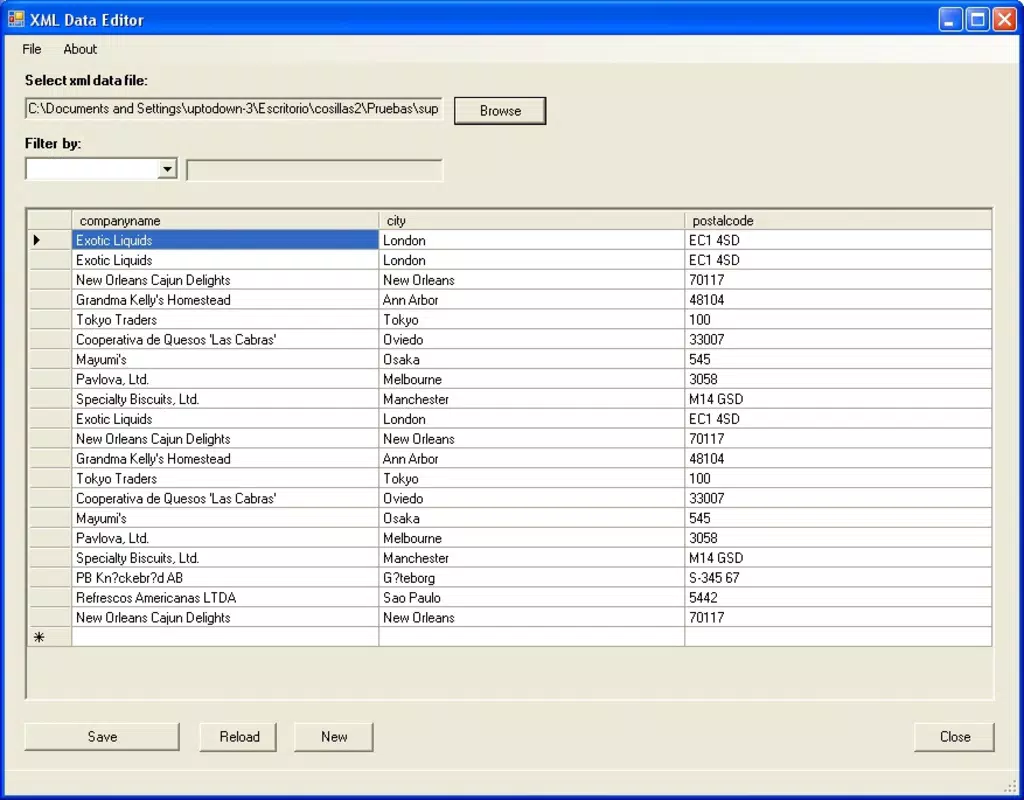

Download XML Data Editor – User-Friendly XML Tool for Android and iOS
Overview
XML Data Editor is a practical mobile application designed for users who regularly interact with XML (Extensible Markup Language) files. It serves as a lightweight yet effective utility for creating, viewing, and modifying XML documents directly on smartphones and tablets. The app addresses the common challenge of accessing and editing structured data on mobile devices, which is often hindered by the lack of dedicated tools in the mobile ecosystem. Its primary purpose is to simplify XML handling for developers, system administrators, and technical professionals who need to make quick edits or validate document structure while on the move.
Target users include individuals working in software development, data integration, web services, and technical documentation. Real-world use cases involve updating configuration files, validating data formats, or preparing input for APIs and backend systems. The app’s straightforward workflow enables users to load an existing XML file, make changes, and save the result without requiring complex setup or external tools. Although the developer did not provide additional background information, the app’s long-standing presence since 2006 suggests a stable, niche-focused tool that has maintained relevance over time.
Within the mobile app ecosystem, XML Data Editor fills a specific gap by offering a dedicated solution for structured data manipulation. Unlike general-purpose text editors, it provides XML-specific functionality such as syntax highlighting and structured navigation, making it a valuable asset for professionals who rely on accurate and consistent XML formatting.
Key Features & Functionality
- User-Friendly Interface: The app features a clean, intuitive layout that minimizes learning curves for both beginners and experienced users. Navigation is streamlined, allowing direct access to core editing functions without unnecessary steps.
- File Creation Capabilities: Users can generate new XML documents from scratch, defining root elements, attributes, and nested structures to meet specific project needs.
- Effortless File Loading: The app supports quick loading of existing XML files, enabling immediate access to content for review or modification.
- Efficient Data Modification: Built-in tools allow for rapid updates to existing entries, including adding, removing, or editing elements and attributes with minimal effort.
- Structured Editing Environment: The interface maintains document hierarchy, helping users visualize relationships between elements and avoid structural errors.
For example, a developer can use the app to adjust a configuration file on a mobile device while traveling, ensuring that API endpoints are correctly formatted before deployment. Similarly, a technical writer might use it to validate XML-based documentation templates without needing a desktop environment. The ability to create documents from scratch is particularly useful for prototyping or testing data structures before integrating them into larger systems.
Interface, UX & Performance
The user interface of XML Data Editor is designed with clarity and functionality in mind. It presents XML content in a structured, hierarchical format that enhances readability and reduces the risk of syntax errors. Navigation is based on a tree-like view, allowing users to expand and collapse elements for better organization. The visual style is minimalistic, focusing on content rather than decorative elements, which supports long editing sessions without visual fatigue.
Interaction is smooth, with intuitive touch controls for selecting, editing, and reordering elements. The app responds promptly to user input, maintaining a responsive experience across various device types. Although the developer did not list formal performance metrics, the app’s lightweight nature suggests efficient memory usage and fast load times, even on older devices.
Stability appears to be a consistent strength, given the app’s longevity since its release in 2006. Users can expect reliable behavior during editing tasks, with no reported issues related to crashes or data corruption. The app maintains a consistent state during file operations, ensuring that changes are preserved accurately upon saving.
Platform Compatibility & Technical Requirements
XML Data Editor is available for both Android and iOS platforms, making it accessible to a broad range of users across major mobile ecosystems. The app supports the latest versions of these operating systems, ensuring compatibility with current devices. However, the developer did not specify minimum OS requirements or exact version numbers for compatibility.
The file size of the application is reported as 1.5 MB, indicating a lightweight footprint that does not consume significant storage space. This makes it suitable for devices with limited capacity. While specific hardware requirements were not listed, the app’s small size and efficient design suggest it can run smoothly on mid-range and older smartphones and tablets.
Pros and Cons
Pros
- Simple and intuitive interface suitable for users of all skill levels.
- Enables creation of new XML files from scratch with full structural control.
- Supports quick loading and editing of existing XML documents.
- Lightweight design with minimal storage and memory usage.
- Long-standing presence in the market, indicating reliability and stability.
Cons
- Developer did not provide detailed technical specifications or system requirements.
- No mention of advanced features such as syntax validation or auto-completion.
- Limited information on file export formats or integration with cloud services.
- Compatibility with older OS versions was not disclosed.
- Specific performance benchmarks or device optimization details were not listed.
FAQ
Is XML Data Editor free to download and use?
The app’s pricing information was not disclosed. Users should verify the current cost on their respective app stores.
Can I edit XML files on my smartphone using this app?
Yes, XML Data Editor is designed specifically for editing XML files directly on mobile devices, allowing users to make changes on the go.
Does the app support saving files in different formats?
The developer did not specify the range of supported export formats. Users should check the app’s functionality after installation.
Is XML Data Editor secure for handling sensitive data?
While no specific security features were mentioned, the app operates locally and does not require internet access for basic editing tasks, reducing exposure risks.
How often are updates released for XML Data Editor?
Update frequency was not provided. Users should monitor their app store for new versions and improvements.
Final Thoughts
XML Data Editor stands out as a dependable, no-frills solution for mobile XML editing. Its clean interface, straightforward functionality, and lightweight design make it ideal for professionals who need to work with structured data outside of a desktop environment. While it lacks advanced features like real-time syntax validation or cloud integration, its core capabilities are executed efficiently and reliably.
Users who frequently handle XML files—such as developers, system integrators, or technical content creators—will find significant value in having a dedicated mobile tool that supports quick edits and file creation. The app’s long history and consistent performance underscore its trustworthiness in a niche but essential domain.
For anyone seeking a secure, easy-to-use utility to manage XML data on Android or iOS, XML Data Editor delivers a practical and effective experience.
Download XML Data Editor now


